Communication coach for iPhone

Communicate like a leader.

You had the right idea. LeadPhrase helps you say it so people at work can act on it, and teaches you the pattern behind it, so you need the coach a little less each week.

Coming soon on the App Store See an example
  • English and French
  • No account
  • Stays on your iPhone

The signature feature

How would a senior say it?

Paste something you actually said. LeadPhrase shows what your listener may have heard, why it didn't land, and how an experienced leader would put it.

The situation

A recovery call with Vyntra, a software vendor running late. There are already checkpoints on Tuesday and Friday.

“My point is not to avoid email communication, but to communicate directly through meetings. So when you have problems, you have a meeting and you address it immediately.”

Their reply

“But your new engineer, will we see him on a weekday?”

What they may have heard

That you want more meetings, without knowing when or why.

What got in the way

  • Double negative
  • No context anchor
  • Vague mechanism
  • Benefit left implicit
  • No explicit ask
  • Overly imperative

Senior version

“On top of our Tuesday and Friday checkpoints, let's agree that either side can set up a short working session the same day whenever a blocker comes up, so we fix it quickly together instead of going back and forth by email.”
  • Context
  • Ask
  • Shared ownership
  • Concrete action
  • Trigger
  • Benefit
  • Positive framing

The pattern to reuse

Anchor → Change → Benefit → Ask

Codes, not corrections

Twelve codes experienced communicators use without thinking

LeadPhrase isn't a grammar checker. It checks your message against twelve codes, shows which ones are missing, and helps you practise them until they become habits.

  1. 01

    Context

    Start from what the audience already knows.

    “On top of our Tuesday and Friday checkpoints…”

  2. 02

    Signal

    Say clearly why you are speaking now.

    “There is one risk I want to flag.”

  3. 03

    Concrete action

    Explain concretely what should happen.

    “Either team can organise a 15-minute session the same day.”

  4. 04

    Purpose

    Explain the purpose.

    “…to protect the go-live date.”

  5. 05

    Benefit

    Explain why the listener should care.

    “…so your team gets answers the same day.”

  6. 06

    Ask

    Make the response you need unmistakable.

    “Can we agree on this approach?”

  7. 07

    Ownership

    Clarify who does what.

    “Our team will draft it; can yours confirm the test data?”

  8. 08

    Timing

    Say when.

    “…before Friday's checkpoint.”

  9. 09

    Positive framing

    Say what you want, not what you don't want.

    “Let's use email for information and short calls to solve blockers.”

  10. 10

    Relationship

    Keep cooperation, even when escalating.

    “I'd like us to solve this together.”

  11. 11

    Executive ordering

    Put information in the order the audience needs it.

    “Situation → impact → recommendation → decision required.”

  12. 12

    Analogy

    Turn an abstract process into something familiar.

    “If we were in the same office, we'd just send a Teams message.”

What's inside

From a rough thought to the meeting itself

01

Three versions, ready to use

Type, paste or dictate what you want to say. You get a recommended version, a shorter one and a more diplomatic one, each with the codes it uses ticked off. Need a tweak? Make it shorter, firmer, more executive or easier to say aloud in one tap.
02

Three cards for the meeting

Meeting Prep turns your goal into three short messages: the situation, your recommendation and the ask. Glance at them in Meeting Mode, in a widget, or on your Lock Screen with a Live Activity.

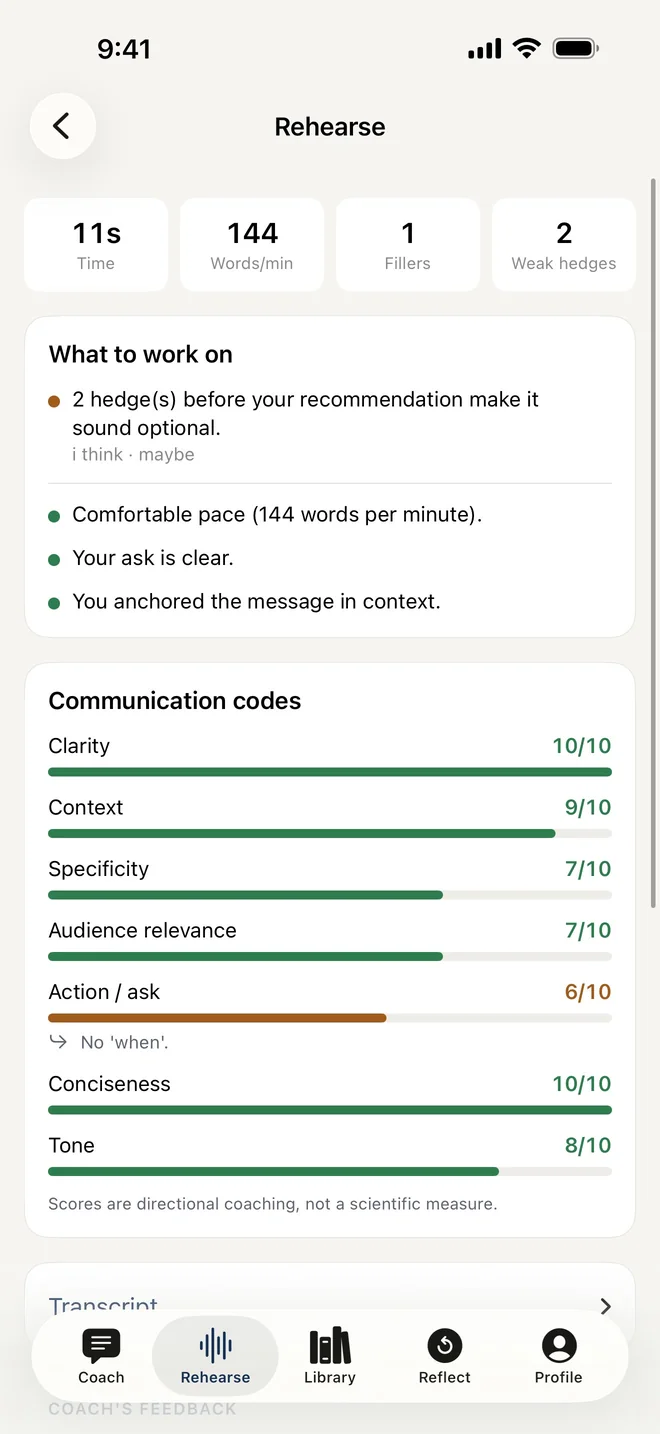
Rehearse out loud
03

Rehearse out loud

Say it once before you say it for real. LeadPhrase measures your pace, filler words, hedges and how clearly you ask, right on your iPhone. The audio never leaves it.

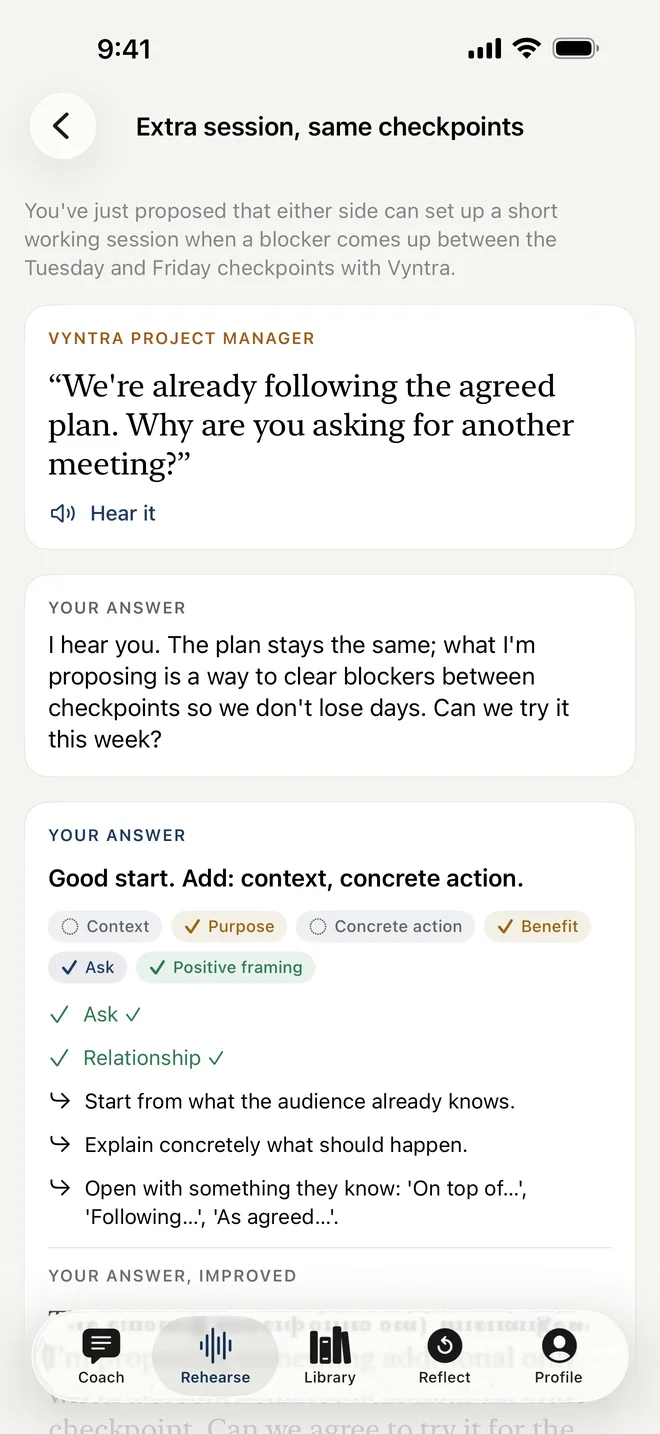
Practise the hard moments
04

Practise the hard moments

Thirty drills for the moments that go wrong: a vendor pushing back, an impatient executive, scope creep, a production incident. Answer out loud, then compare with a strong response.

05

See what's changing

Progress by dimension, never one opaque score. A profile built only from evidence in your own messages: behaviour, never personality labels. And Patterns I've Learned, your own playbook.

Phrases in two languages
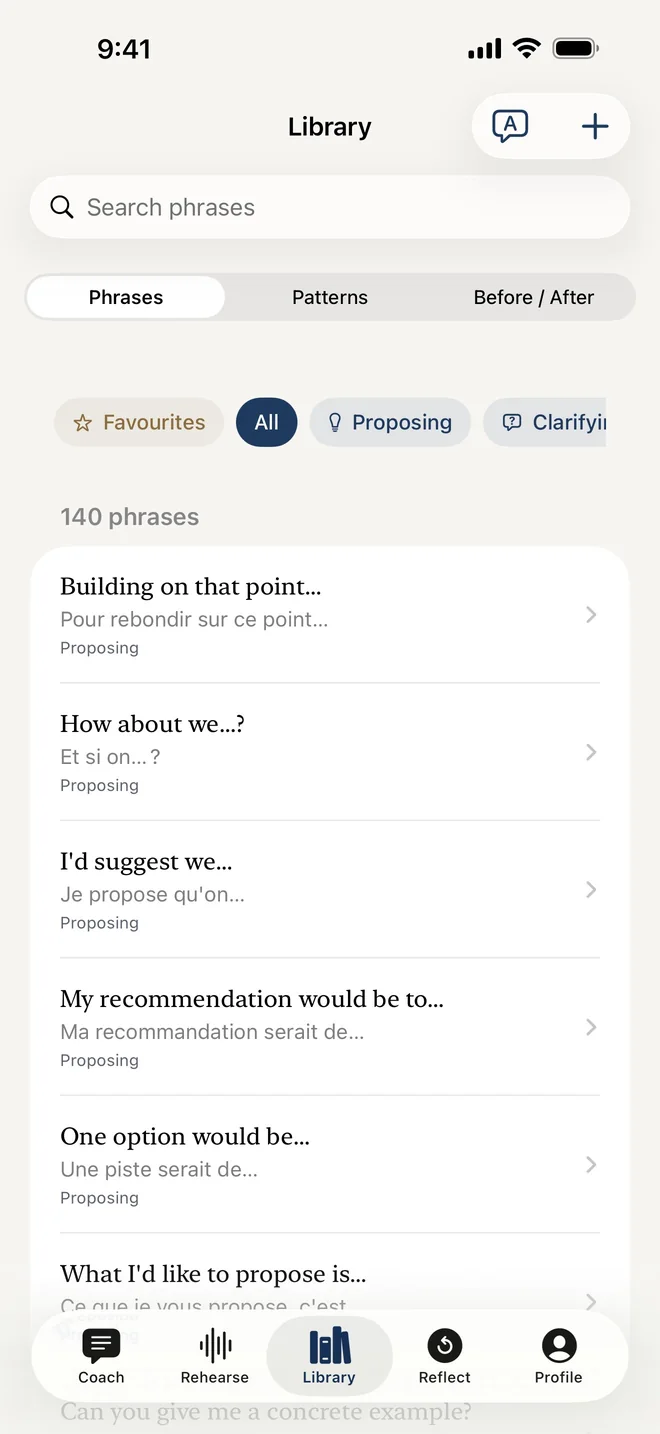
06

Phrases in two languages

More than a hundred phrases for proposing, disagreeing, escalating and closing, in English and natural French. Built for people who work in a second language.

Who it's for

For people with good ideas and little airtime

  • Working in a second language

    Clear sentences that are easy to say aloud and sound credible. The goal isn't to sound native.

  • Experts talking to the business

    Lead with the impact and the decision you need, then the detail, in that order.

  • New managers

    Ask, delegate and escalate without sounding passive or harsh.

Privacy

Your words stay yours

Work conversations are confidential. LeadPhrase is built so you never have to think twice about what you type.

  • No account, no tracking

    Nothing to sign up for. No analytics, no ads, no third-party SDKs.

  • Kept on your iPhone

    Messages, rehearsals and reflections are stored on your iPhone. We don't run servers that could hold them.

  • Audio stays on the device

    Speech is transcribed on your iPhone. Recordings are never saved or sent.

  • Your AI, your key

    For full rewrites, connect OpenAI, Mistral or any compatible service with your own key. Without one, LeadPhrase still works offline.

  • Safe Rewrite

    Names, companies, projects and amounts are replaced with placeholders before any text is sent, then restored on your iPhone.

  • See it before it's sent

    Strict mode shows exactly what will be sent, and where, before anything leaves your iPhone.

Questions

Good to know

Is LeadPhrase a grammar checker?

No. It works on what grammar checkers don't touch: the order of your ideas, the context you give, the benefit for your listener and how clearly you ask. A sentence can be perfectly correct and still not land.

Does it record my meetings?

Never. You prepare before the meeting, glance at your cards during it and reflect afterwards. Rehearsals use the microphone only while you practise, and the audio stays on your iPhone.

Do I need an AI subscription?

No. Analysis, patterns, drills and the phrase library work offline. For full rewrites, add an API key from OpenAI, Mistral or any OpenAI-compatible service, including your company's own gateway. You pay that provider directly for what you use.

What is sent to the AI provider?

Only the text of your request and the settings you chose, after Safe Rewrite has replaced names and figures. No history, no contacts, no identifiers. Nothing goes through us.

Which languages are supported?

English and French, for the interface and for coaching. The French is written natively, not translated word for word.

Which iPhones does it run on?

Any iPhone with iOS 18 or later.

Make your next message the one they act on.

LeadPhrase is coming soon to the App Store, for iPhone.

Coming soon on the App Store